
Home / Import a product
Get a product link ready for OrientDig
Bring across the seller’s item, then check size, colour and quantity before the order reaches the agent.
How to use OrientDig Spreadsheet: prepare the source link
Start on the Spreadsheet homepage: choose a product category or search for the item you need. Open a candidate and compare its measurements, seller and available options. Save the original product URL with your chosen size, colour, version and quantity.
For several candidates, use the local link organiser to tidy repeated URLs, while keeping option notes separately. Reopen the final source link and check the selected item before copying it into OrientDig. The Spreadsheet and organiser prepare your choices; the agent account is where the purchase is submitted.
Open the seller’s listing and copy the complete product URL. Avoid copying a shop home page, image URL or search-results page. For an app share link, open it first and check that it leads to the exact item.
Paste the link into OrientDig’s product search. Its guide supports Taobao, Tmall, 1688 and Weidian links. The imported result is the point to verify the product again.

Confirm the option, not just the main image
Select the colour or model, size and quantity. Re-read the price after selecting the variant; a listing can contain several products at different prices.
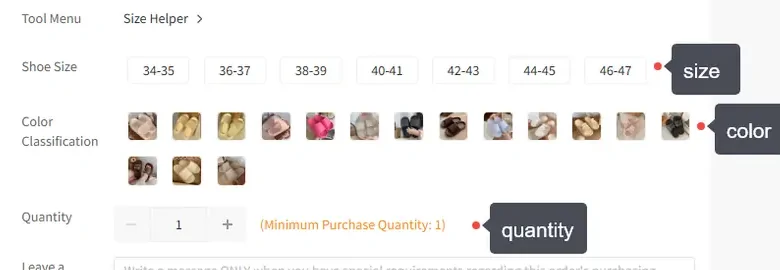
Copy the seller’s option wording into your notes if it is ambiguous. Ask about missing measurements or included accessories before proceeding. An agent’s translated title is not a substitute for the specification.
When the link will not import
Check that the original listing still opens and has the variant you want. Remove optional sharing fields only if the product identifier remains intact. The link-cleaning guide explains the difference.
For an unsupported listing, OrientDig’s DIY Order lets you provide purchase details. Supply the seller URL, item, option, quantity and price, then ask the agent to confirm what it can purchase. This does not restore an out-of-stock item or bypass shipping restrictions.
When you only have a picture
OrientDig also has image search. Use a clear product image and compare the results with the original details. An image match can suggest a listing; it cannot establish that the material, maker or quality is the same.
Once you have a candidate, open the seller’s page and repeat the option and size checks.