
Home / Buying guide
Your OrientDig purchase, from cart to warehouse
Keep the selected options, payment and seller messages together so you know what has been ordered and what is still waiting.
OrientDig buying guides
Follow the order below, or open the instructions for your current step.
Make the buying decision before checkout
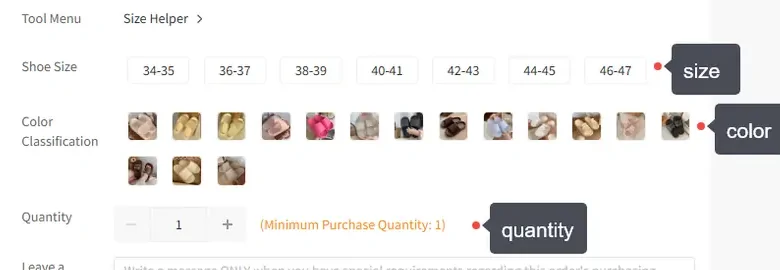
Compare the seller, recent product feedback and the measurements you need. Keep the exact seller URL with the colour, size and quantity. Check minimum quantities and any restrictions on sending the item to your destination.
Use a short order note for a concrete request. For example: “One beige bag, medium size, with the long strap shown in the listing. Please contact me if that option is unavailable.”
Missing product details should be resolved with the seller through the agent. Do not fill them with assumptions simply to get past the form.
How to use OrientDig: place and pay for the order
In your OrientDig account, review the imported product and selected options, then add to cart or proceed to checkout. Check the quantity, goods total and Chinese shipping charge before confirming the purchase payment.
Use a payment method offered in the account. If the payment provider shows a charge but the order is still unpaid, compare both records and ask account support before paying the same order again.
The international parcel is arranged later. Keep that second payment in your budget from the start.
Open full-size image
Read the message behind an order status
If the seller cannot supply the item, choose a refund or explicitly approve an alternative. Ask where a refund will appear; a return to your agent balance and a withdrawal to a payment provider are different steps.
Decide what to do when it arrives
Open the warehouse item and its inspection photos. Match it with your order, then look for the selected variant, quantity and any requested detail. Ask for a missing view or measurement before approving shipping.
If the item is wrong, explain the mismatch and ask about return or exchange while the seller’s window remains open. Keep it out of the parcel until the request is resolved.
Record the storage deadline for each item. Do not assume it resets when a later purchase arrives. Ask support before leaving goods in the warehouse beyond the stated period.
Inspect the goods and plan the parcel →
Shopping precautions for your OrientDig order
Keep the source URL, chosen options and seller terms with the order. Check restricted contents and route availability before purchasing. Reserve money for the parcel rather than using the entire budget on goods.
Ask about a wrong item or missing view while it is in the warehouse. Check return deadlines before removing packaging or submitting international shipping. Save the parcel record until the delivery has been checked.