
Home / QC & shipping
Inspect, pack and track your OrientDig parcel
Use the warehouse stage to resolve product problems before the goods leave China, then choose delivery for the parcel you have.
What is QC?
QC is the inspection and photography of the item received at the warehouse. It helps you see an incorrect option, missing piece or visible defect. It does not authenticate a brand or establish how an item will perform after use.
- Match the warehouse item with the original order and its selected size or model.
- Open the photographs at full size. Look at colour, tags, seams, fastenings and included parts.
- Compare a measurement with the seller’s chart and your own reference item.
- Ask for a particular missing view or measurement, confirming any service charge.
- Choose to keep, query, exchange or return before submitting the item for delivery.
For electronics, ask whether functional testing is available. Do not read a photograph of a sealed box as a successful function test.
Resolve a mismatch while the item is still stored
Send the order number, selected option and the photo that shows the problem. Describe a specific difference: wrong size label, missing strap or damage to a seam.
Ask about seller acceptance, the return deadline and any postage or service charge. Keep the item unshipped until you have a decision. Returns after international delivery can be much more complicated.
Select the items and the protection they need
In Warehouse, select only the items ready to travel. Combining purchases may reduce repeated parcel charges, but a larger parcel can enter a different weight or size bracket.
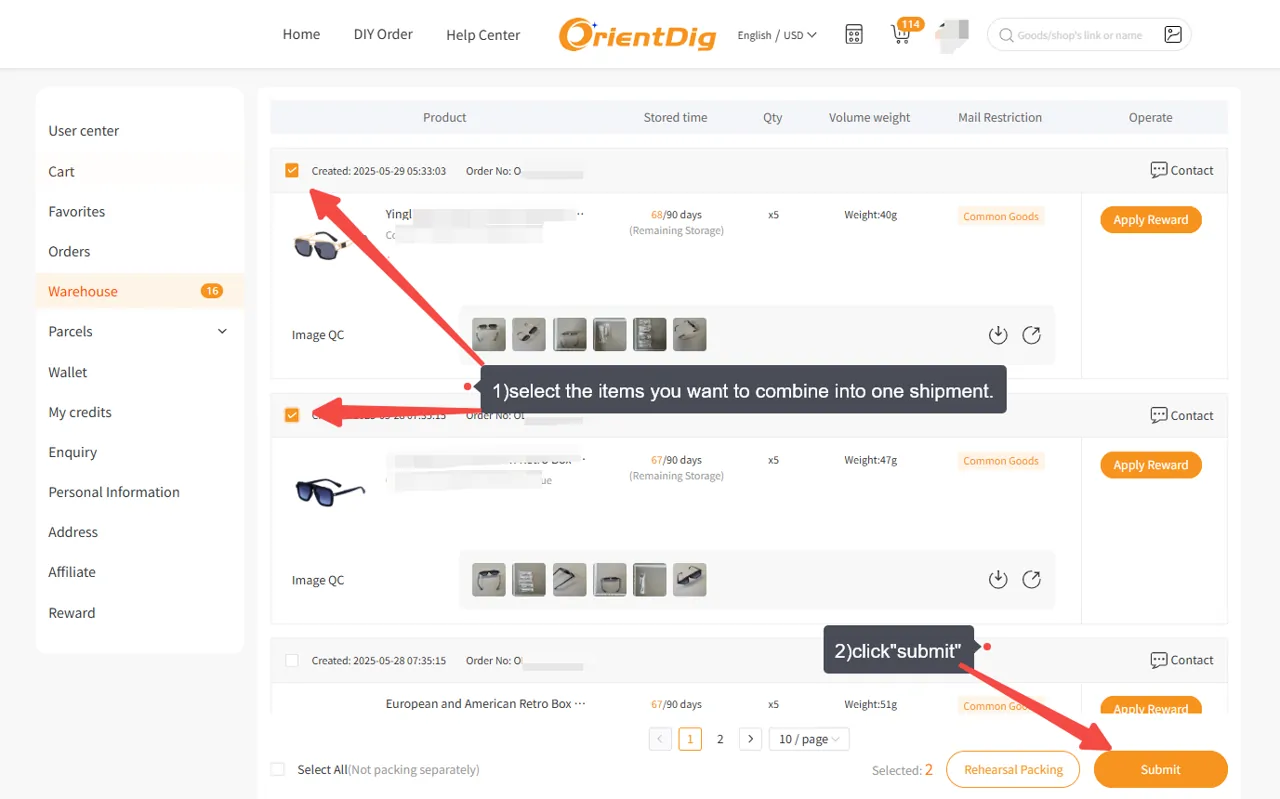
Choose what packaging to retain, remove or reinforce. Keep a protective retail box if removing it would expose a fragile item. Confirm that shoe-box removal, for example, is applied only to the items you intended.
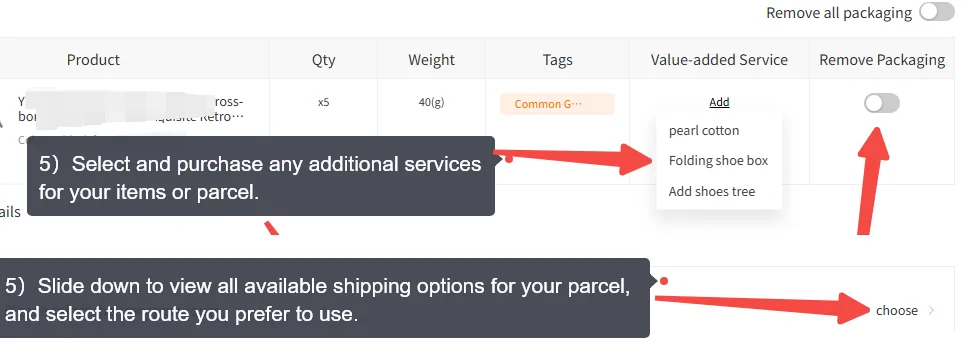
OrientDig shipping: compare eligible parcel routes
Check item restrictions, maximum dimensions, tracking and the terms for loss or damage. Batteries, liquids and other special contents may limit the routes offered.
Compare chargeable weight, including the route’s volumetric rule where used. A bulky light box can cost more than its scale weight suggests. Read the packed weight and dimensions when the final quote is available.
Enter accurate address and customs information. Review the route’s tax and document requirements for your destination, and distinguish an estimate from a guaranteed delivery date.
If you pay an estimated shipping deposit, follow the final charge and any balance adjustment in your parcel account.
Follow the parcel through to receipt
Open the parcel record and its details after dispatch. Save the tracking number and watch for carrier acceptance after label creation. Check whether the international handover produces a separate local tracking number.
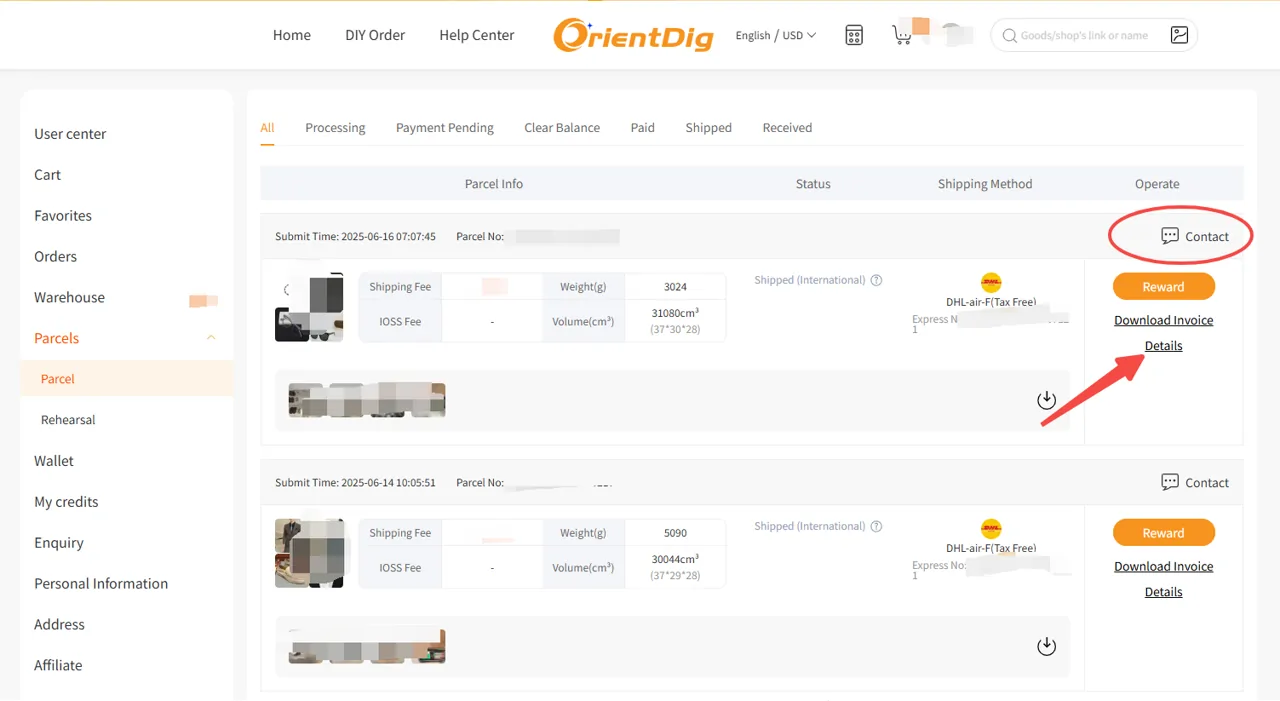
At delivery, check the packaging and item count before discarding anything. For damage or missing goods, keep the label, box and packing materials, take clear photographs and raise the issue promptly from the parcel record. Check the current claim deadline.
Get help with a delayed or damaged parcel →
How to check OrientDig QC photos
- Open the warehouse record for the correct order. Match quantity, size label, colour and version with the original choices.
- Inspect overall shape and the close views relevant to the item: seams, fastenings, print placement or included parts.
- Ask for a specific missing measurement or angle. A general request to check quality gives less guidance than an insole length or a photo of the reverse.
- Keep an unresolved item out of the parcel. Confirm the return process, deadline and cost before authorising dispatch.